
Organizer setup
Ping a Discord channel with webhooks
By Tim Sullivan Updated
When signups open for Crimson Tavern Friday, you want your Discord crew to know without you copy-pasting a link. Webhooks do that. Slaydate posts a tidy embed to a channel the moment something happens with your event.
It's also Discord-only for now (Slaydate validates that the URL is a real Discord webhook).
Wiring it up is two steps: save a webhook in Settings, then attach it to an event and pick when it fires.
Grab a webhook URL from Discord
In Discord, open the channel you want pinged, go to its settings, and create a webhook under Integrations. Copy the webhook URL it gives you.
That URL is the whole secret. Anyone with it can post to your channel, so treat it like a password. Slaydate stores it masked (you'll only ever see the last few characters again).
Save it in Settings and send a test
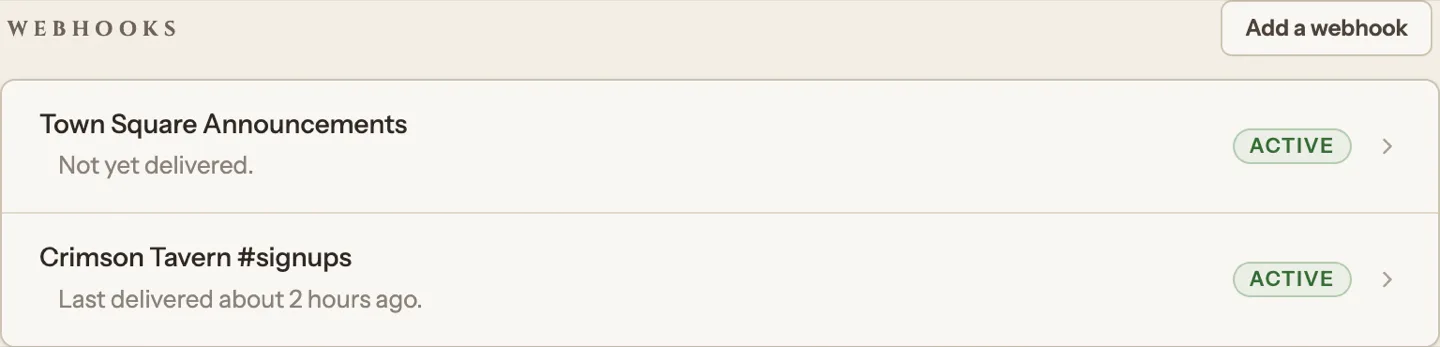
Open Settings, find the Webhooks section, and hit "Add a webhook." Paste the Discord URL and give it a label you'll recognize later ("Tavern regulars," say). Slaydate only accepts Discord webhook URLs, so a Slack or random link gets rejected on the spot.
Save it, then hit "Send test." A test ping lands in your Discord channel within a second or two. If it doesn't, double-check you copied the full URL.
Attach the webhook to your event
Now go to Crimson Tavern Friday, open its Settings tab, and find the Webhooks row. Your saved webhook shows up here as an option you can switch on for this event.
A webhook saved once in Settings can be reused across every event you run. Attaching is per-event, so each event only fires the webhooks you've turned on for it.
Pick which moments fire it
Choose the triggers: when signups open, when stories are published, and when the event is cancelled. Turn on whichever ones matter. Most organizers want signups-open and stories-published; cancelled is the one you hope never fires.
You can add an optional message that posts above the embed (up to 280 characters). This is where @everyone, @here, or a role mention goes if you want Discord to actually ping people. Without one, the embed posts quietly. Keep it short, like "@here seats just opened for Friday at the Crimson Tavern."
Know the auto-disable rule
If a webhook fails to deliver five times in a row (channel deleted, URL revoked, Discord down), Slaydate disables it so it stops hammering a dead endpoint. The Active pill in Settings flips off when that happens.
Fix whatever broke (usually a fresh URL from Discord), then re-enable it from Settings. That resets the failure count and it's back in service. A successful "Send test" is the fastest way to confirm it's healthy again.
That's the whole loop. Save once, attach per event, and let Slaydate do the announcing.
One thing worth saying out loud: the signups-open ping fires the moment you actually open signups, and the cancelled ping fires when you cancel the event. So set your triggers before that moment, not after, or you'll miss the announcement you wanted.