
For organizers
Invite people to your event
By Tim Sullivan Updated
When you want specific people at your game, you don't have to send the link and hope! Slaydate can send each person a personal email with a button that points them at your signup page. You can paste a list of addresses or check off people who've signed up to your previous events.
One thing to set straight up front: an invite is not a reservation. It's a nudge toward your public signup page, where each person picks a room (if there's more than one) and grabs their own seat. Here's the whole loop, from finding the button to reading the confirmation.
Find the Invite button
From the management hub for Crimson Tavern Friday, click the Attendees tab. In the toolbar above the roster, over on the right, there's an Invite button (a plus-sign icon next to the word Invite).
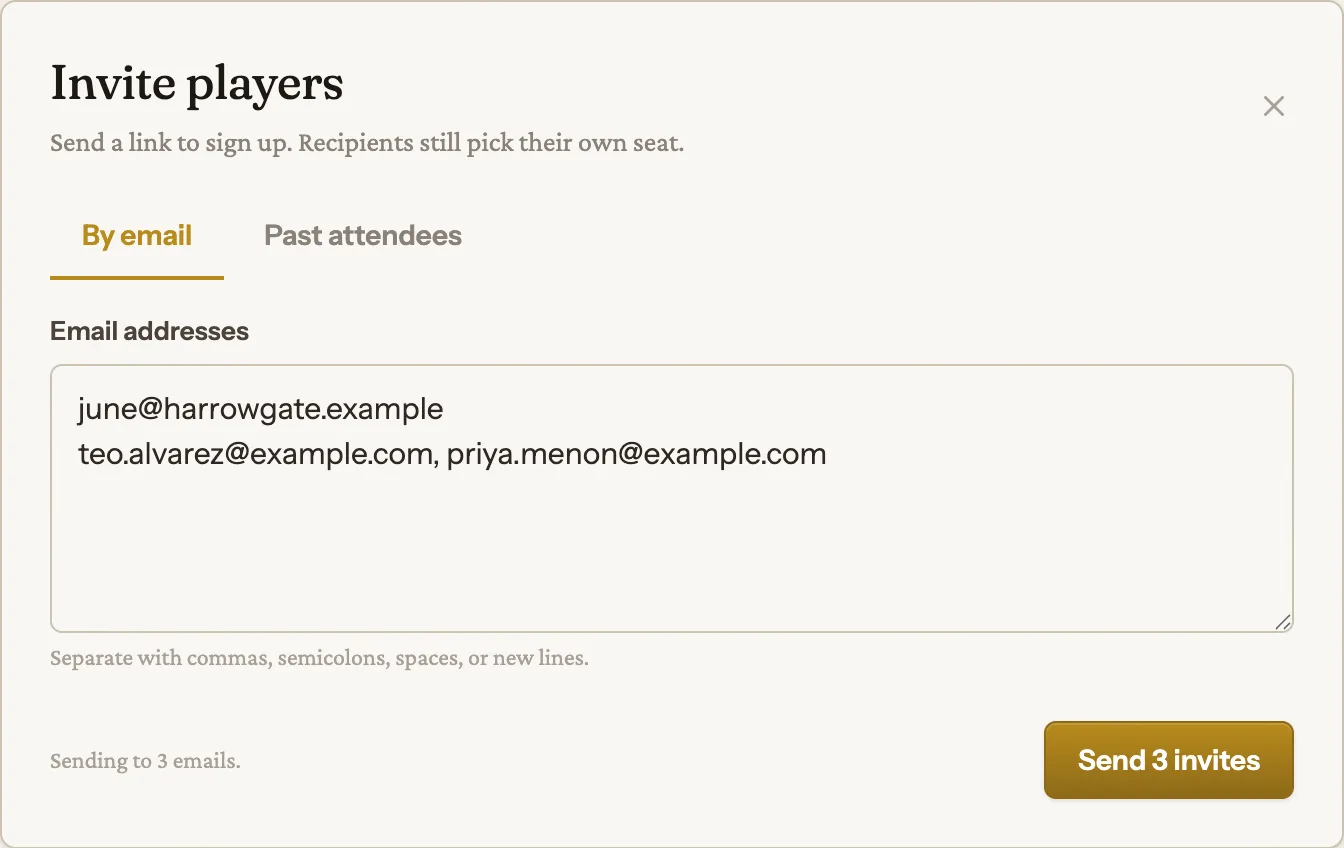
Click it and the "Invite players" modal opens. The subhead spells out what it does: "Send a link to sign up. Recipients still pick their own seat." The modal has two tabs (By email and Past attendees) that both feed one Send invites button.
Paste emails on the By email tab
The By email tab is a single text box. Paste in as many addresses as you like, separated however you've got them. Commas, semicolons, spaces, or new lines all work.
A live counter under the box tracks how many recipients you've got selected. The Send invites button stays disabled until at least one address is in, and the summary line beside it reads "No recipients selected." until then.
Pick from past attendees
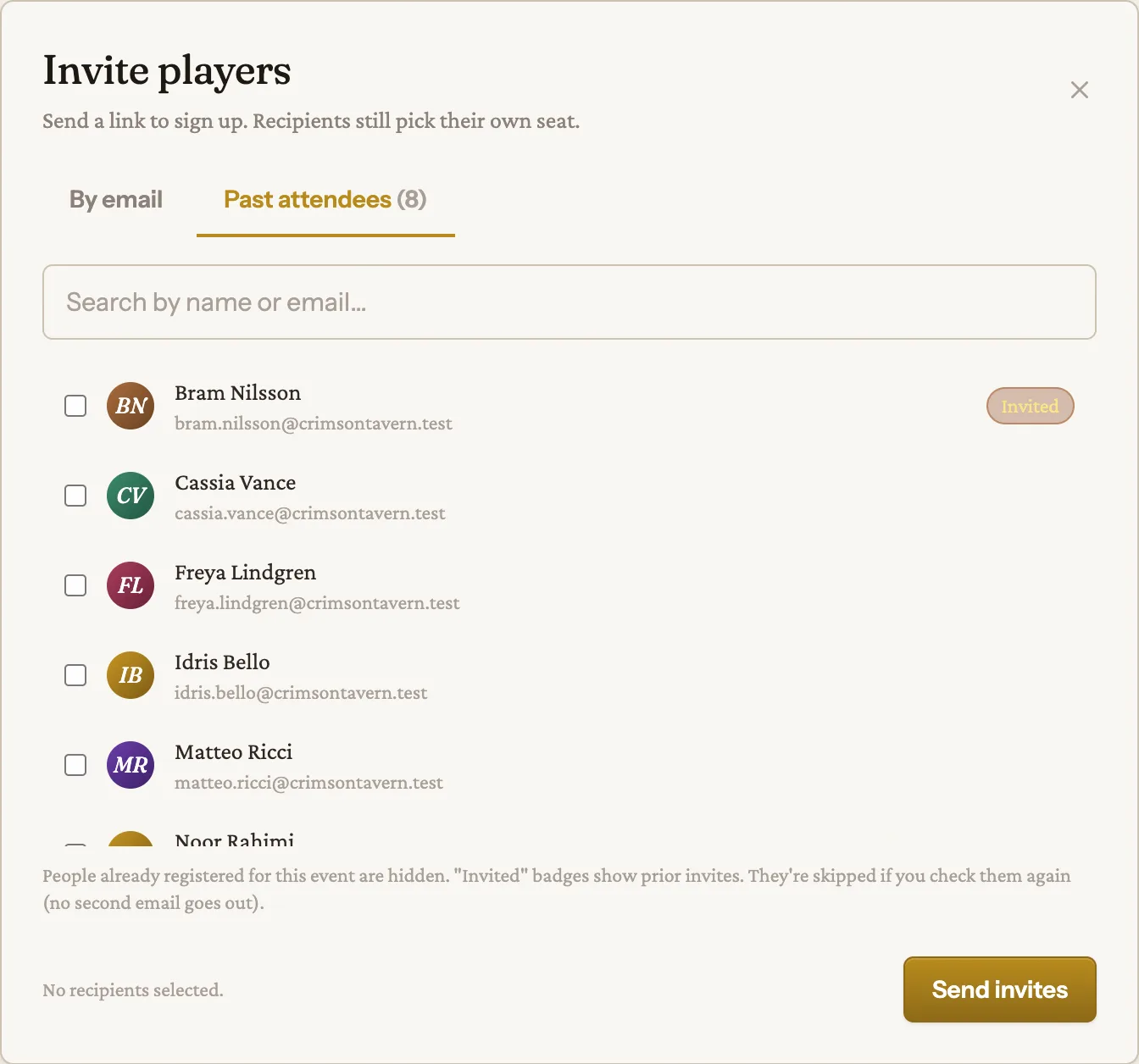
The second tab, Past attendees (N), is a checkbox list of everyone who's registered for your other events but isn't already in for this one. Each row shows a checkbox, avatar, name, and email, plus a search box to filter by name or email.
People already registered for Crimson Tavern Friday are hidden (no point inviting someone who's already got a seat). Anyone you've already invited to this event wears an "Invited" badge. Check the people you want, and they add to the same recipient count the email tab feeds.
Know what an invite actually does
Sending an invite does not hold a seat or add anyone to your roster. Each person gets an email subject-lined "You're invited: Crimson Tavern Friday" with a button (labeled "Reserve your spot") that links to your public signup page, not a direct seat. The email even says it outright: you won't sign anyone up unless they grab a spot themselves.
From there they go through normal signup: pick a room if you're running more than one (The Manor or The Cellar), drop their email, click the magic link. An invited person shows up on your Attendees roster only once they've actually signed up. The invitation is tracked separately so Slaydate can skip duplicates, but on its own it isn't a registration.
Because that button lands on the public page, signups should be open when you invite. Invite while the door is shut and your recipients hit the closed state.
New emails get an account automatically
If an address belongs to someone who isn't on Slaydate yet, that's fine. Slaydate creates an account for them on the spot (no password, magic-link sign-in, same as how storyteller invites work) and sends the invite.
They sign in by clicking the link in their email, then pick a room and a seat like anyone else. You don't have to pre-register anyone.
Read the confirmation summary
Hit Send invites and Slaydate drops you back on the Attendees tab with a one-line flash that tells you exactly what happened, for example: "Invited 8 people. Skipped: 2 already registered, 1 already invited, 1 invalid email." If nothing went out, it says "No invitations sent."
The skips are worth understanding. Anyone already registered for the event is skipped. Anything that isn't a valid email is counted as invalid and skipped. And anyone you've already invited is skipped too, with no second email. That last one is the catch: re-checking an "Invited" past attendee does not fire a second email. Slaydate skips them. If you need to nudge a no-show, reach them another way.
That's the loop. Open Attendees, hit Invite, paste a list or check off past attendees, and send. Each person gets a personal link to your signup page, and they appear on your roster once they claim a seat.
Keep two things in mind. Open signups before you invite, or the link lands on a closed page. And an invite is a nudge, not a held seat, so the waitlist and capacity rules you set still apply when each person signs up.