
For organizers
Duplicate an event or set up a series
By Tim Sullivan Updated
A good game is worth running twice. When Crimson Tavern Friday wraps, you don't rebuild it from scratch. You clone it, or you stamp out a whole season in one go.
Slaydate gives you two ways to reuse an event. Duplicate makes one copy you tweak and reopen. Make recurring lays down a run of dates on a schedule you pick. Both live in the same place, and both carry your setup forward so you're not retyping room names and webhooks every week.
Find the two reuse actions
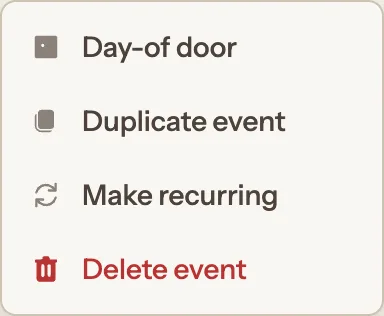
Open the management hub for the event you want to reuse. Next to Edit, there's a three-dots "More actions" button (the kebab menu). Click it and you'll see Day-of door, Duplicate event, Make recurring, and Delete event.
There's a second way in, surfaced when it's most useful. Once an event is in the past, a card shows up on the Event tab: "The event is done. Schedule the next one?" with Duplicate event and Make recurring buttons right there. Same two actions, no menu-hunting after the event you just ran.
Both are always available, on any event. No setting to flip first.
Duplicate in one click
Click Duplicate event and Slaydate makes the copy on the spot, then drops you on the new event's organize page with a notice: "Event duplicated. Click Edit Details to update the name and date."
The copy's title is the original with "- Copy" appended (a second copy becomes "- Copy 2", and so on). The date gets pushed forward one week, keeping the same start time, duration, and timezone. If that week already holds another of your events, it steps forward a week at a time until it finds a free slot, so you never land on a clash.
Know what carries over (and what doesn't)
The copy brings your whole setup with it: the location (address, map pin, and the further instructions), the description, the cover image, every room (name, capacity, description, and order), every storyteller, every attached webhook with its triggers and message, and the settings toggles (ask for pronouns, code of conduct, show attendee count, show attendee list, acceptance email text).
What it does not bring is the people. The copy starts with an empty roster. Nobody from Crimson Tavern Friday is seated or waitlisted on the new event, which is what you want.
Two things start deliberately off: signups are CLOSED and the event is UNLISTED. That's so you can look it over before anyone can find it. Public listing is not copied to a duplicate (it resets to off, unlike a recurring series, where it does carry over). The usual move is Edit Details to fix the name and date, then open signups when you're ready.
Open the recurring-series modal
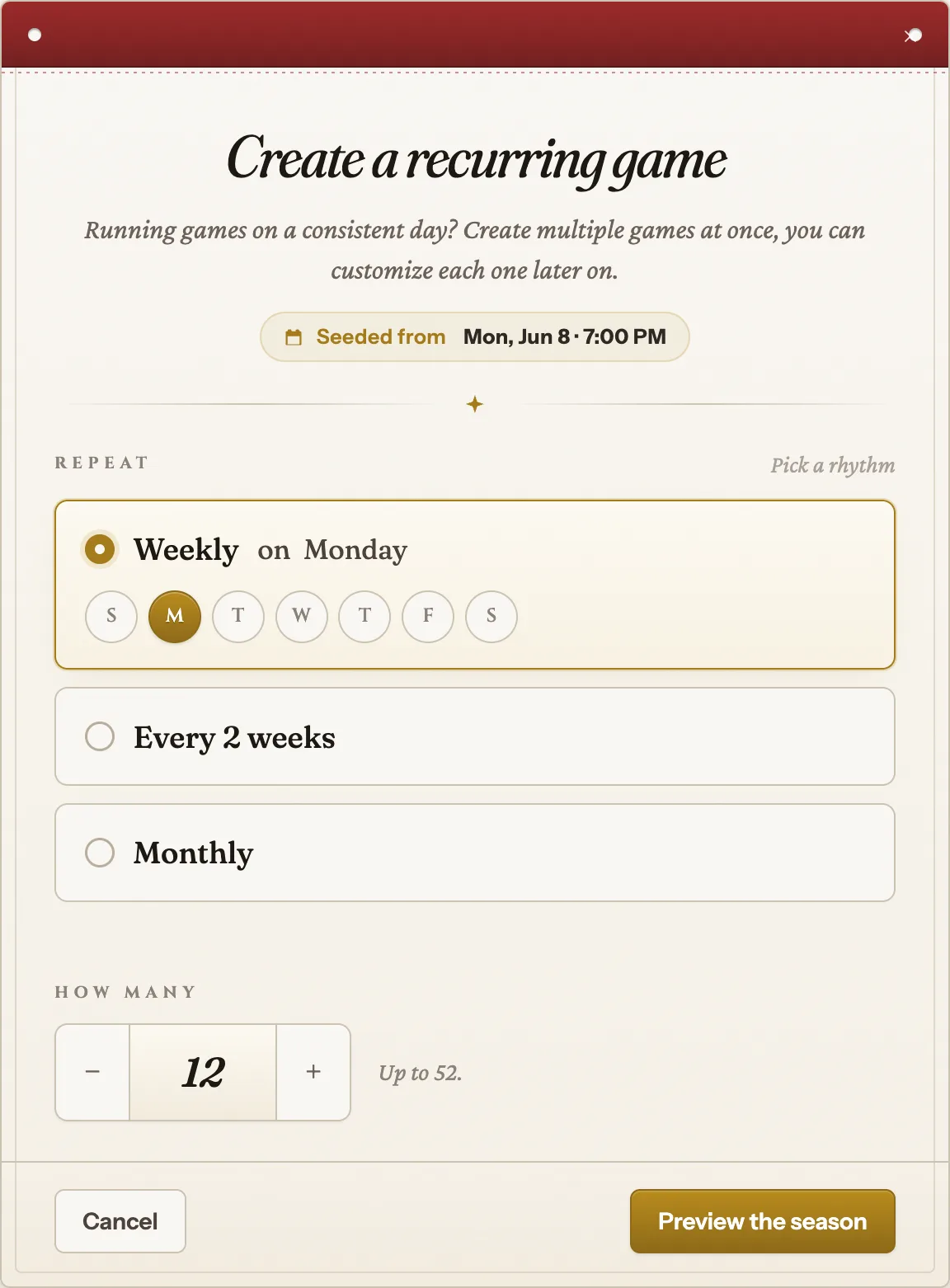
For a run of dates instead of a single copy, click Make recurring. A modal opens titled "Create a recurring game."
Up top it shows what it's seeded from: the event's current date and time. Every date it generates inherits that start time and duration, so a 7:00 PM Friday seeds 7:00 PM games.
Pick a rhythm and a count
Under Repeat, choose one cadence. Weekly on a weekday you pick (tap the S M T W T F S day pills). Every 2 weeks on a weekday you pick. Or Monthly, which has two patterns: "On the [Nth] [weekday] of the month" (the 2nd Friday, say) or "On the [Dth] of the month" (the 8th).
Under How many, the stepper runs from 2 to 52 occurrences and defaults to 12. For a Crimson Tavern season you might set Weekly on Friday, 12 games.
When the form looks right, click Preview the season.
Read the preview and watch for skips
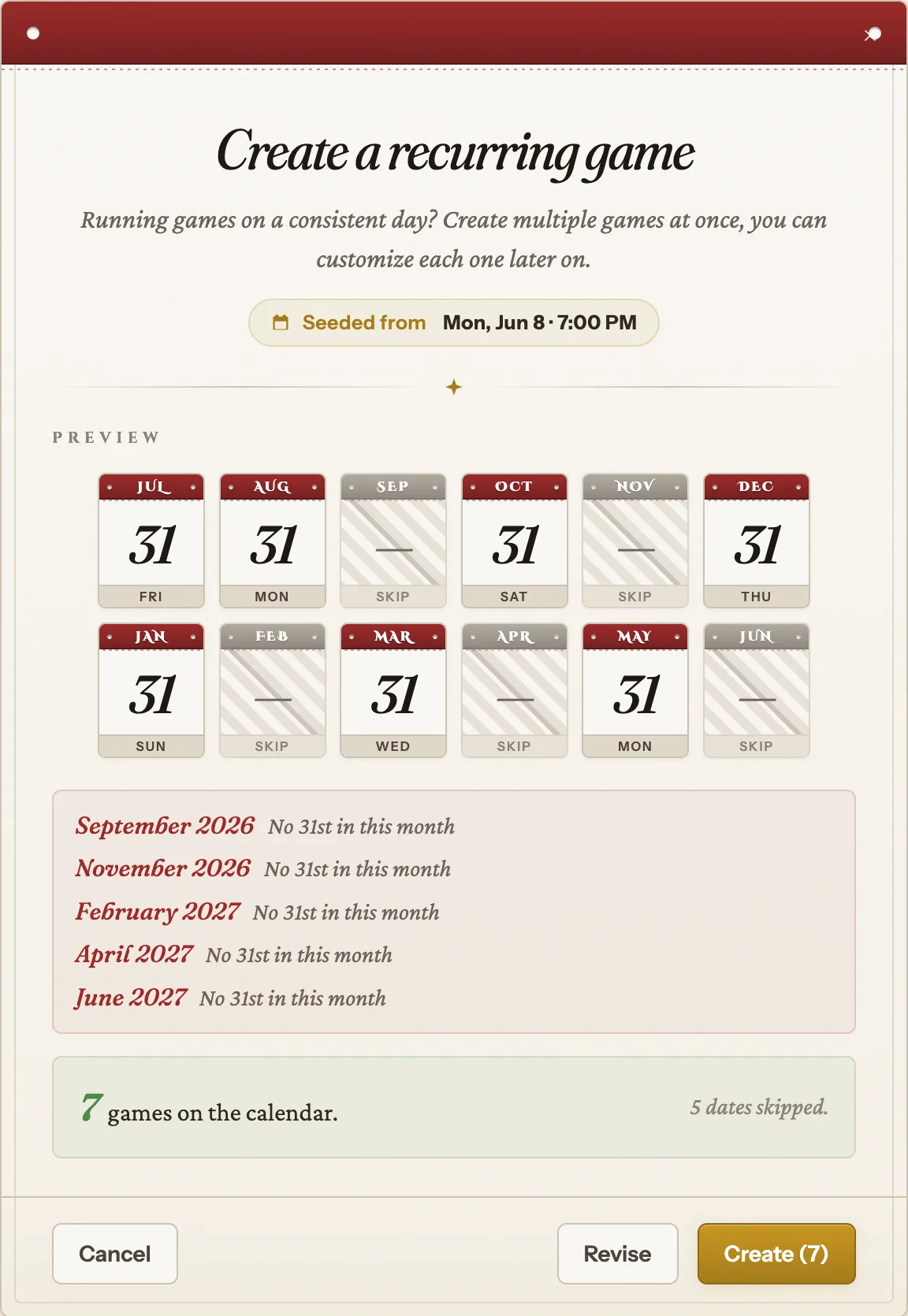
The preview lays out a strip of small calendar tiles, one per date, before anything is created. Some tiles may be marked SKIP. A date gets skipped when it clashes with another of your existing events, with an earlier occurrence already placed in this same series, or when the pattern can't happen that month (the 31st in a 30-day month, or a 5th Friday in a month with only four). The reason for each skip is listed right under the strip.
Skips don't extend the run. Ask for 12 with 2 skipped and you get 10. The summary says so plainly: "10 games on the calendar." with "2 dates skipped."
To change something, Revise takes you back to the form with your choices intact. When it looks right, Create (N) commits and creates exactly N events.
After you commit
The occurrences are linked together as one series, and the original seed event joins the series too. Each occurrence copies the same content a duplicate would (rooms, storytellers, webhooks, settings, description, image).
Signups start CLOSED on every generated occurrence, on purpose. A series can span months, and you don't want seats claimed in March for a game in June. Open signups per occurrence as each one gets close. (The public-listing flag carries over from the seed event, which is one place a series differs from a single duplicate.)
There's no per-occurrence editing inside the modal. To customize any single occurrence, open it from its own management hub afterward.
Duplicate when you want one more event you'll review and reopen by hand. Make recurring when you know the whole season's rhythm and want the dates laid down at once.
Either way, the work you put into rooms, storytellers, and webhooks comes along for free. You just review the copy, fix the name and date, and open signups when each one gets close.