
Settings
Turn on browser notifications
By Tim Sullivan Updated
You want to know the moment someone joins a waitlist, not the next time you happen to refresh the page. Browser notifications give you a real popup on your screen when there's news on your event.
This guide covers turning them on, what they alert you about, and how they're different from the New Signup Emails digest (which is a separate thing entirely).
Open the Notifications section in Settings
Head to Settings and find the Notifications section. There are two rows here, and they do different jobs.
One is New Signup Emails (a batched email). The other is Browser notifications (an instant popup). This guide is about the second one. Look for the row labeled Browser notifications with a button that says Turn on.
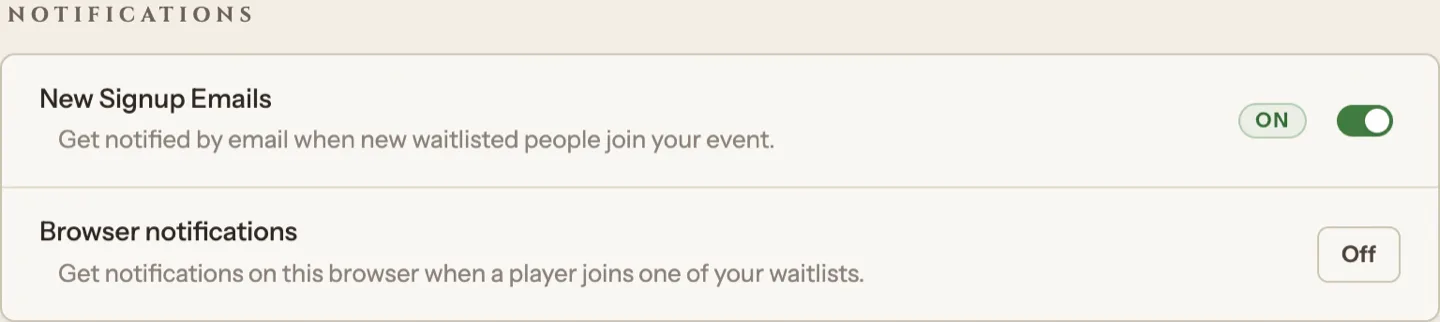
Click Turn on and approve the browser prompt
Click Turn on. Your browser will pop up its own permission prompt asking if Slaydate can send notifications. Approve it.
Once you allow it, the button switches to On for this device. That's it. If you accidentally block the prompt, the button shows Blocked, and you'll need to re-allow notifications for the site in your browser settings before Slaydate can turn them on.
Know what they alert you about
With browser notifications on, you get a real-time popup when a player joins one of your waitlists for, say, Crimson Tavern Friday. You'll also hear about it when a player leaves a note on their signup.
Click the popup and it takes you straight to the event's organize page. No refreshing, no checking back.
Turn it on for every browser you use
Browser notifications are per-device. The permission lives in the specific browser you approved it in, so turning it on at your laptop does nothing for your phone or a second computer.
If you organize from more than one place, repeat the Turn on step in each browser. Each one gets its own popups.
Don't confuse them with New Signup Emails
The other row, New Signup Emails, is a separate switch. It sends you a batched email digest of new waitlisted signups (not an instant popup, and not tied to any one device).
The two are independent. Browser notifications are an instant popup on this browser. New Signup Emails are a periodic email in your inbox. Run both, run one, run neither. Up to you.
One note: if you don't see the Browser notifications row at all, this site's push setup isn't configured, and there's nothing to turn on yet.
Players can use browser notifications too. They get popups about events they've joined, set up the same way in their own Settings.