
Organizer guide
Add storytellers to your event
By Tim Sullivan Updated
Every room needs a Storyteller running the table. Slaydate lets you give those people their own way into the event: a read-only look at who's coming, the door check-in screen on game day, and a pairing code for the Blocktower companion app.
You add them one at a time, by email, from the Storytellers tab. Here's the whole thing.
Open the Storytellers tab
From your event hub for Crimson Tavern Friday, look at the tab bar across the top: Event, Rooms, Attendees, Storytellers, and the rest. Click Storytellers.
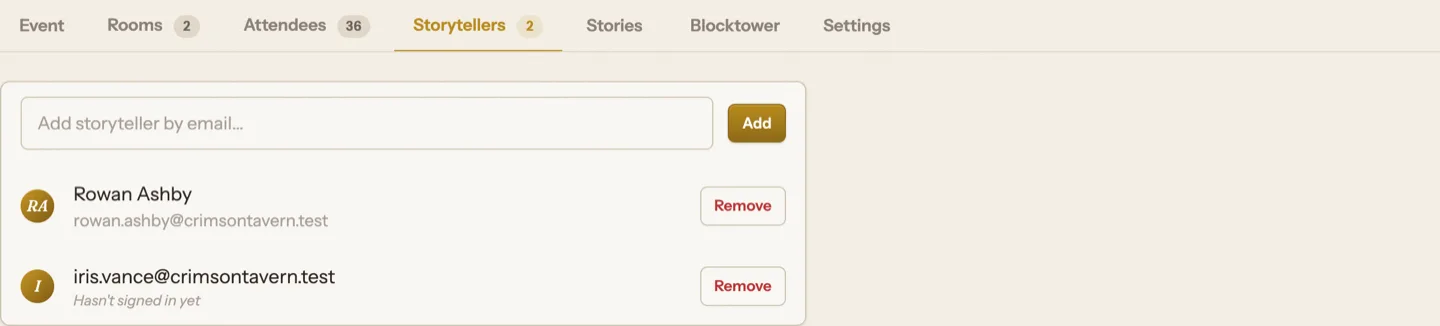
You'll see a single field, "Add storyteller by email...", with an Add button, and below it the list of anyone you've already added.
Add one by email
Type the person's email and hit Add. That's it. They're now a Storyteller for this event, and Slaydate emails them an invitation.
If you fat-finger something that isn't an email, Slaydate tells you and nothing happens. Add the same person twice and it just says they're already on the list.
What a brand-new email gets
If the email belongs to nobody on Slaydate yet, that's fine. Slaydate creates an account for them on the spot and sends the invite.
They sign in by magic link (no password, ever). And because the account can organize too, they're free to run their own events down the line. Until they sign in for the first time, their row reads "Hasn't signed in yet" so you know the invite is still sitting in their inbox.
Know what being a storyteller grants
Once added, a storyteller gets their own /storytell link: a read-only roster of the event. They can see the rooms (The Manor, The Cellar), who's seated, and who's on the waitlist. They can't change signups.
They also get day-of door access to check players in, and they can pair the Blocktower app with a QR code. That pairing code works until about a week after the event, then it expires on its own.
Remove someone when you need to
Each row has a Remove button. Click it, confirm, and they lose their roster link, door access, and Blocktower pairing for this event right away.
Storytellers can also remove themselves from their own /storytell page, so you're not the only one holding the keys.
Add a storyteller per room and your tables are covered. They see the roster, work the door, and run Blocktower without you having to forward a thing.
When game day arrives, the door check-in screen is where everyone (you and your storytellers) actually works the line.