
For players
Find an event and sign up
By Tim Sullivan Updated
You got a link to a Blood on the Clocktower game and you want a seat. Here's the whole thing, start to finish.
No account to set up first. No password to invent. You give Slaydate your email, click the link it sends, and you're in. That's the entire login.
Open the link the organizer sent you
Slaydate events don't show up in a public search you can browse. You get to one because the organizer shared the link (in a group chat, a Discord, an email, wherever your crew hangs out).
Open it and you land on the event page. You'll see the title, the date and time, who's hosting, and a description of the event. For Crimson Tavern Friday that's Friday, June 8 2026, 7:00 to 11:00 PM, hosted by Marguerite Vale.
One thing you won't see yet: the exact address. The page says "Register to see the exact address" and shows just the city (Ottawa) until you're confirmed. That's on purpose.
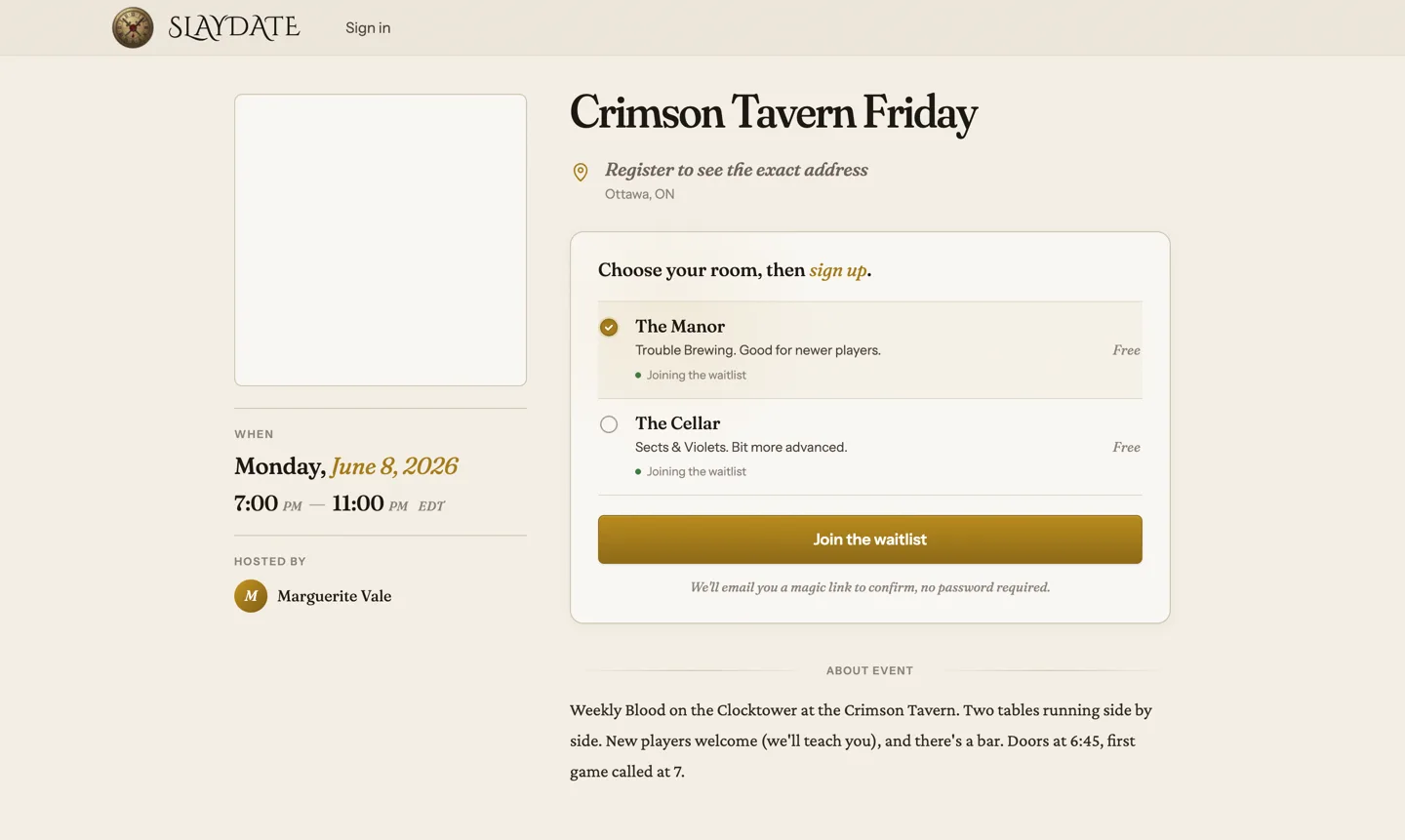
Pick your room (if there's more than one)
Some events run several games side by side. Each room is one table with its own Storyteller, its own script, and its own 15 seats. Crimson Tavern Friday has two: The Manor (Trouble Brewing, good for newer players) and The Cellar (Sects & Violets, a bit more advanced).
The signup card lists each room with its blurb and how full it is. Tap the one you want. If a room is full, it shows "Full" and "Closed" and you can't pick it.
If the event only has one room, you skip this entirely. There's nothing to choose, so Slaydate doesn't ask.
Hit the join button
The button says "Get a ticket" if there's a seat open, or "Join the waitlist" if the room (or the whole event) is already full. Both Crimson Tavern rooms are full, with 6 people waiting, so you'd see "Join the waitlist" here.
Click it and a small window opens asking for your email. That's all it needs. Type it in and submit.
Confirm with the magic link
Slaydate emails you a link. Open the email, click it, and that click both verifies your address and locks in your spot. No password anywhere.
The link is good for 15 minutes, so don't let it sit. Until you click it, your seat (or waitlist spot) isn't actually held. The window will tell you it's waiting on that confirmation.
Click it and you're done. Now the page shows the real address and you can add the event to your calendar.
Answer anything extra the organizer asks
Depending on how the organizer set things up, the join window might ask for a couple more things before you finish.
You may be asked for your pronouns. You may be asked to read a code of conduct and tick a box agreeing to it. If those toggles are off, you won't see them at all. You always set a name for the event so people know who's at the table.
Know what the waitlist means
Landing on the waitlist isn't a no. It's a line. When someone confirmed drops out, the next person moves up into the open seat.
You don't have to do anything to climb. Slaydate handles the order (first on, first up) and emails you if a seat opens for you. So joining the Crimson Tavern waitlist behind those 6 people is worth it if you want to play.
That's it. Find the link, pick a room if there's a choice, drop your email, click the magic link. You'll get a confirmation either way, and if you're waitlisted, you move up on your own as seats free up.
Once you're confirmed, your ticket lives on the event page. Bring it to the door.